
 Business Object Overview
One of the keys in creating flexible, object-oriented .NET applications is using business objects.
What is a Business Object?
A business object is a high-level object that usually represents a real-world entity such as a person, place, or business process.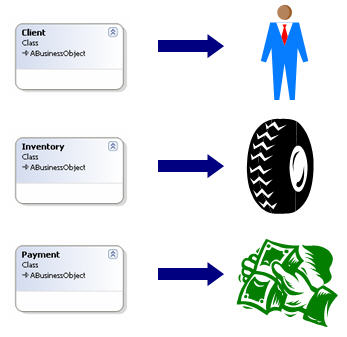
As shown in the above diagram, you create a Client business object that represents a real-world client, an Inventory business object that represents real-world inventory, and a Payment business object that represents a real-world payment.
If you're familiar with data modeling, this concept shouldn't be foreign. In many cases data is used to represent the characteristics or properties of real-world entities. A Client table contains the characteristics of a client such as their name, address, phone, e-mail address, and so on. An inventory table contains characteristics of a piece of inventory such as the quantity on hand, price, description, and so on. However, data only represents half the picture.
Business Objects: Combining Attributes and Behavior
Business objects bring together both the attributes and behavior of a real-world entity.An entity object, such as you see in the Entity Framework, contains properties describing the attributes of a real-world object. This is only half the story.
A real world object's behavior translates into methods on a business object. For example, in the real world, inventory can be sold. You model this on a business object by creating a Sell method on the Inventory business object that reduces the specified inventory by a given amount. In the real world inventory can be placed into stock. You can model this by creating an AddToStock method on the Inventory business object that increases the specified inventory by a given amount.
Benefits of Using Business Objects
Here are some great reasons for using Business Objects in your .NET applications.Application Scalability
If you're thinking about the future, you probably want your application to be scalable. For example, developers creating Windows applications may want them to scale from the desktop to the cloud - some or all of their application needs to be accessible from the cloud.However, if you place your application logic in the user interface, how can you access that code from the cloud? The answer is, you can't! In contrast, if you place your application logic in methods of business objects, as shown in the following diagram these objects can be accessed from a Windows application, an ASP.NET Application, Windows Azure, WCF, and so on.

Data Flexibility
At times, the type of data accessed by your application may change. For example, you may have an application that currently accesses Visual FoxPro or Access data but eventually scales to SQL Server or Oracle. In other cases, you may have a vertical market application that needs to access different back ends for different clients.If you place your data access logic in the user interface (as demonstrated in most of the available ADO.NET samples) you often end up hard-coding your data access. In contrast, if all data access in your application takes place through business objects (as shown in the following diagram), you only have one place to change your data access code.

Taking this concept further, MM .NET business objects access data by means of a family of data access objects that you can swap out depending on your data access needs. For details, see Data Access with MM .NET.
Solving the "Where's the Code" Problem
Have you ever played "Where's the code"? When you place your application logic in methods of user interface elements it can be a real challenge finding the code you need. Business objects make a huge difference in solving this problem. For example, if your application has a problem with Invoicing, chances are the problem code is in the Invoice object. If your application has a bug in calculating inventory, the first (and probably last) place you need to look is in the Inventory business object. In addition, if you've given your business object methods descriptive names such as GetOrdersByCustomerID or CalculateOverdueFee, you'll make it much easier to find the code you need.Normalizing Application Logic
When working with databases, the term "normalize" means "to eliminate redundancies". How redundant is your application logic?If you're placing your application logic in the user interface, you probably have a lot of redundancy...especially when working with a team of developers. Multiple developers working on different forms may create duplicate logic because they rarely look at code written by other developers.
In contrast, if you place your application logic in business objects, the chances you'll create multiple methods that do the same thing are slim - especially if you name your methods well. Writing less code means debugging and maintaining less code!

Comment or report problem with topic