
 Installing the MM .NET Framework 2026
System Requirements
Before installing MM.NET 2026 v10.0.0, you must first install Visual Studio 2026 Community Edition or higher.Installing MM .NET 2026 v10.0.0
- If you have previously installed a version of MM .NET, you can either leave it installed on your computer (new and old versions coexist peacefully) or uninstall it using the Add or Remove Programs option in Control Panel.
- Run the Microsoft Windows Installer program MM .NET Framework 2026 v10 Installation.msi. This displays the MM .NET Framework installation wizard:
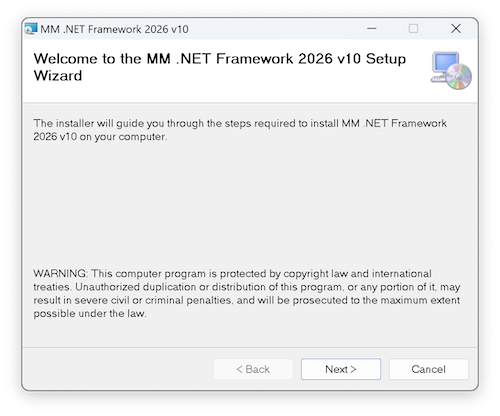
- Click Next to go to the Select Installation Folder page. This page prompts you to select an installation folder. The default location is C:\Program Files (x86)\MM .NET Framework 2026 v10.0.0, but you can change it to any drive and directory.
- Click Next to go to the Confirm Installation page.
- Click Install to begin the installation.
- When the installation is complete, click the Next button.
Installing MM .NET User Interface Controls
The main task of the installation program is to install the MM .NET assemblies on your computer. If you want to add the MM .NET WPF, Windows Forms and Web Forms controls to the Toolbox in Visual Studio, check out the following Help topics:- Adding MM .NET WPF Controls to the VS Toolbox
- Adding MM .NET Windows Forms Controls to the VS Toolbox
- Adding MM .NET Web Forms Controls to the VS Toolbox
Under the Hood: What the Installation Program Does
There are several things the installation program does for you:- Copies the MM .NET Framework files to the directory you specified during installation.
After the installation is complete, your directory structure should look like this:

- Adds the MM .NET Business Layer Generator as a Visual Studio Extension.
- Copies MM .NET Project Templates to the following folder:
C:\Users\<username>\Documents\Visual Studio 18\Templates\ProjectTemplates
- Copies MM .NET Project Item Templates to the following folder:
C:\Users\<username>\Documents\Visual Studio 18\Templates\ItemTemplates
- Adds the MM .NET Framework DLLs to this folder:
C:\Program Files\OakLeaf\MM.NET\2026\10.0.0\Assemblies
As shown here:

- Adds an MM .NET Framework key to the Windows Registry that specifies MM .NET is an installed product for Visual Studio:
Computer\HKEY_LOCAL_MACHINE\SOFTWARE\Microsoft\VisualStudio\18.x\InstalledProducts\MM .NET Framework 2026 10.0.0
This registry entry contains the following keys:


Comment or report problem with topic